


Spending Too Much Time Fixing Technology?
If your technology team spends most of its day putting out fires, it may be time to figure out what keeps starting them.
Reset the password. Fix the printer. Find the missing Chromebook. Troubleshoot the WiFi. Set up the new employee. Figure out why *that thing that worked perfectly yesterday* suddenly doesn't work today.
Sound familiar?
School technology teams have become the unofficial owners of an ever-growing list of devices, systems, software, accounts, and problems. As our friends at 12M & Ed Tech Recruiting put it:
If it has a password, connects to WiFi, plugs into a wall, or somehow involves a printer, there is a good chance someone will eventually assume IT owns it.
And while each of those little fixes may take only a few minutes, together they can consume an enormous amount of staff time.
So before you automatically decide you need another employee, another piece of software, or another outside provider, it may be worth asking a different question:
Before You Hire, Buy, or Outsource: Six Questions to Ask 
When a technology team is overwhelmed, the solutions can seem pretty obvious. Hire another person. Buy a new system. Bring in outside support.
Sometimes one of those is absolutely the right answer. But through our work with schools on technology leadership, assessments, and searches, we have also seen that what looks like a technology problem is often something else. It could be unclear responsibilities, inefficient processes, systems that no longer work well together, or simply too much work landing with the wrong people.
Before adding people, systems, or outside support, we think it is worth taking some time to understand the work first. That is the idea behind the six questions in the tool below.
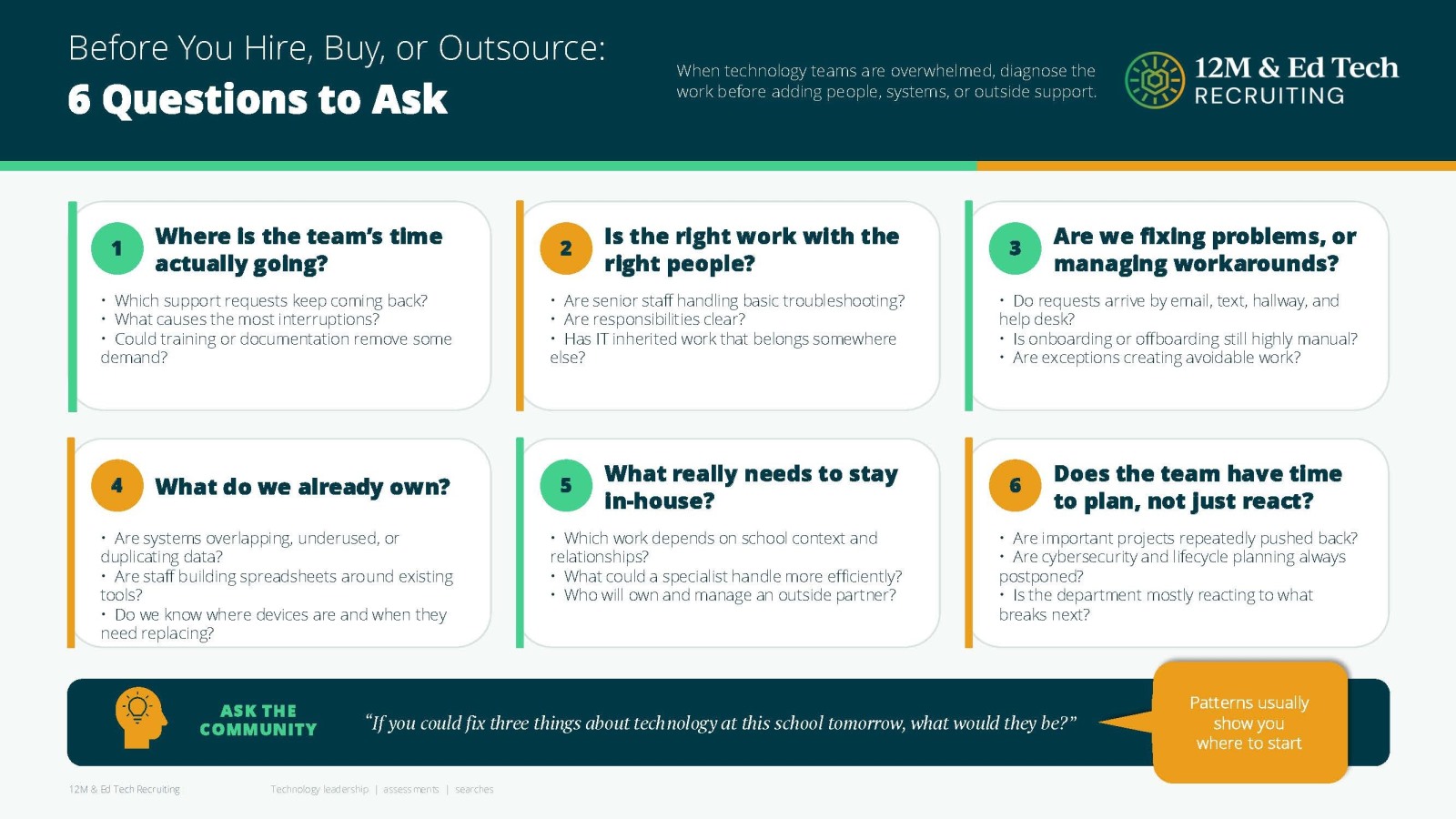
1. Where is the team's time actually going?
You can't fix what you can't see. Look at tickets, recurring requests, manual processes and the tasks that consistently interrupt higher-level work.
2. Is the right work with the right people?
Does your technology director really need to reset passwords, troubleshoot classroom devices or track down equipment?
3. Are you fixing problems, or managing workarounds?
If the same issue keeps coming back, the workaround may have quietly become the process.
4. What do you already own?
Before buying something new, look at utilization, integrations, licensing and whether staff have been properly trained on the tools already in place.
5. What really needs to stay in-house?
Some responsibilities require institutional knowledge and internal ownership. Others may be handled more efficiently through automation, managed services or outside expertise.
6. Does your technology team have time to plan, not just react?
This may be the biggest question of all. If everyone is waiting to see what breaks next, who is thinking about cybersecurity, lifecycle planning, infrastructure, budgeting, and what's coming next?
Anyone who has worked in school technology knows how quickly responsibilities can grow. If it has a password, connects to WiFi, plugs into a wall, or somehow involves a printer, there is a good chance someone will eventually assume IT owns it.
Over time, that can create a department that is incredibly busy without necessarily having enough time for the work that matters most.
What Do You Do With the Answers?
We would not expect every school to have the same answer to these six questions.
For one school, the answer may be another technology position. For another, it may be better help desk support, clearer processes, an outside partner, improved training, or simplifying the number of systems being used.
The important part is understanding the problem before deciding on the solution.
Ask this question: If you could fix three things about technology at this school tomorrow, what would they be?
Ask that question of technology staff, administrators, teachers, and other employees, and patterns usually begin to emerge.
Those patterns can tell you a lot about where to start.
The goal is not to have the biggest technology team or the most technology. It is to have the right people, systems, processes, and support in place so the technology team can spend less time fixing things and more time helping the school move forward.
And fewer printer tickets would not hurt either.
Before You Buy Something New, Check What You Already Have

Here's another question worth asking: Are there resources available to your school that you're not even using? That's especially relevant for MISBO schools, because some solutions may already be included through your Consortium partnerships. For example, Vivacity Tech offers three services to MISBO schools at no additional cost and each tackles a different kind of work that can eat up a technology team's day.
FREE SERVICES from Vivacity Tech
The Goal Isn't More Technology
Sometimes the answer will be another technology position.
Sometimes it will be better help desk support, improved training, managed services, better asset management, a more intentional device life cycle, or replacing a system that creates more work than it saves.
And sometimes, the answer might simply be changing a process or taking advantage of a resource you already have. The important part is understanding the problem before purchasing the solution.
Your technology team shouldn't have to spend every day reacting to whatever breaks next. With the right people, processes, systems, training and support in place, they can spend less time fixing technology—and more time using it to help your school move forward.
Need Help Finding the Right Technology Partner?
Before you start Googling solutions, check the MISBO Purchasing Consortium. From devices and asset management to IT services, cybersecurity, and other technology solutions, MISBO Consortium Partners can help schools find trusted resources while making the most of their purchasing dollars.
Explore MISBO's technology partners and purchasing resources: